A clear foundation
A clear screen, recognisable groups and logical checkout form the foundation. Match the layout to coffees, cakes and other products.
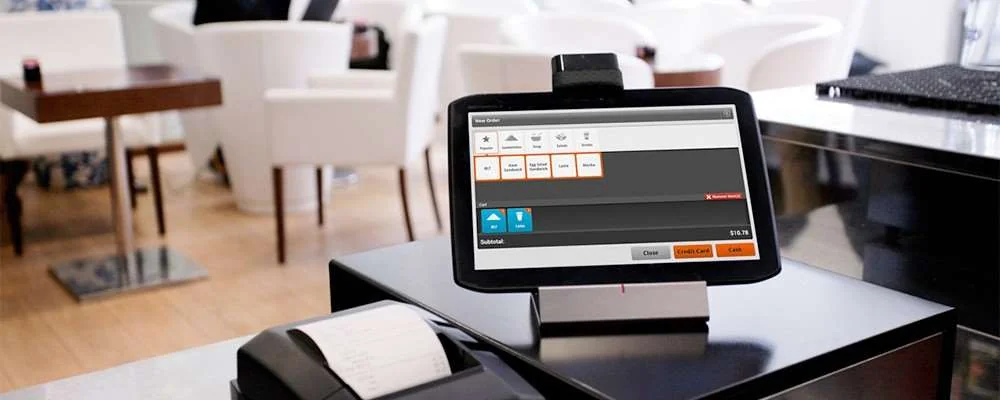
Coffee shops & tearooms · Belgium
Espresso at the counter, takeaway cappuccino or terrace order: your POS must fit your workflow. KassaKompas helps choose clear controls, ordering options and suitable payments.
A POS tailored to your business
A small coffee shop differs from a busy tearoom with table service. Start with daily features, considering your range, ordering, budget and available future additions.
A clear screen, recognisable groups and logical checkout form the foundation. Match the layout to coffees, cakes and other products.
Choose useful options, notes, printers and mobile devices. The right setup helps staff record information consistently.
For more stations or deeper insights, review permissions, reports and integrations. We check supported configurations.
From ordering to preparation
Milk type, extra shot, size or a note: suitable menu setup makes choices clear for order takers and preparation.
Match screens, groups and notes to your range. Agree how notes reach bar or kitchen and how staff track changes.
Test real coffee shop orders in a demo to find a layout that suits your team.
Workstations & payments
One fixed POS may be enough. Larger coffee shops may benefit from tablets, printers or mobile service. We assess order entry, preparation and payment.
Review how devices and stations cooperate. We align bar and kitchen routing with your hardware, software and network.
A suitable integration sends amounts to the payment terminal. We check the provider, models and software versions.
A cash handler may help when cash volumes are high. Discuss space, cash volume and POS integration.
Customers & insights
A coffee shop needs clear figures and workable arrangements as well as hospitality. Define useful information and permissions for products, prices and reports.
Suitable software can customise receipts with your logo or contact details while retaining mandatory information.
Discuss loyalty, prepaid credit or subscriptions if they suit your range. Features, processing and terms depend on the solution.
View turnover and product sales over supported periods. Also agree who may view or change data.
Additions & fiscal setup
Reservation modules, ordering sites and accounting integrations can help. We check connections for each application and version; fiscal setup needs separate assessment.
First map existing applications and required data exchange to identify duplicate entry and necessary arrangements.
GKS obligations depend on activities and turnover. Restaurant and catering services generally have a threshold above €25,000 excluding VAT and drinks. Have your mix of drinks, meals and takeaway assessed.
Source: FPS Finance — who must use GKS?. Checked on 8 November 2026. Also read about GKS 2.0.
Personal advice
KassaKompas helps compare devices, software and guidance, from an affordable starter POS to a full system, based on the workflow you need.
We discuss menu, counter, seating, terrace, staff and existing tools.
Demonstrate a coffee with options, a cake, an order change and payment using your examples.
Agree product setup, installation, team guidance, updates and support. The proposal lists one-off and recurring costs.
Practical answers
A compact touchscreen POS is a good starting point. Review your range, staff, ordering and payments. KassaKompas helps choose suitable core features and additions.
Demonstrate how your orders work. A suitable menu layout gives options and notes a consistent place and sends them clearly to preparation. Features vary by solution.
We check software, devices and network, then each station’s role and order routing between counter, bar and any kitchen.
It depends on provider, device and version. We check connection and payment flow before proposing a combination; not every payment solution works with every POS.
This may be a useful addition, depending on the solution and terms. We check customer identification, credit, benefits and required data.
It depends on activities and relevant turnover, not the name coffee shop. If you serve meals on site, consult your accountant and official GKS guidance.
We check make, model and version, then what remains usable and what needs updating, adding or replacing.
Price depends on equipment, stations, modules and guidance. Ask for clear one-off and recurring costs, including any integrations and support.
Tell us about your range, service and plans. We help find a suitable setup.
0472 60 57 58